
You can set up a static IP address for the printer using Web Config.
Access Web Config.
Select Network Settings.
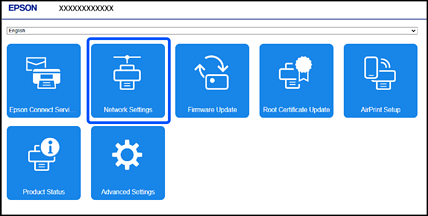
The display contents and items for Web Config differ depending on the model.
Select Manual for Obtain IP Address.
Enter the IP Address you are setting up in IP Address.
Set the subnet mask, default gateway, DNS server, and other network settings set to according to your network environment.
Click OK.
If a login password entry screen is displayed, enter the password and click OK.
The settings are applied.
To access Web Config again, specify the IP address you set.