
|
|
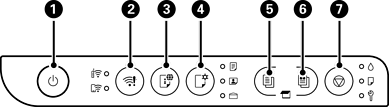
Turns the printer on or off. Make sure the power light is off before you unplug the power cord. |
|
|
When a network error occurs, pressing this button cancels the error. To perform Wi-Fi auto setup, hold this button down for at least 5 seconds, and then press the WPS button on your router. |
|
|
Press this button to print a network connection report, which you can use to determine the causes of any problems you may have using the printer on a network. If you need more detailed network settings and connection status, hold this button down for at least 5 seconds to print a network status sheet. |
|
|
When you print using AirPrint or Mopria, press this button to select the paper size and type. The light ( Checking and Changing the Paper Size and Type Presets Using Web Config |
|
|
Press this button to start monochrome copying on A4 or Letter size plain paper. To increase the number of copies (by up to 20 copies), press this button one more time (within one second of the last press) for each additional copy you want. |
|
|
Press this button to start color copying on A4 or Letter size plain paper. To increase the number of copies (by up to 20 copies), press this button one more time (within one second of the last press) for each additional copy you want. |
|
|
Press this button to stop the current operation. It is also used to perform print head cleaning. |
Additional functions are available by pressing combinations of buttons.
|
|
Check Scanned Images Press the |
|
|
Change the default copy size from A4 to Letter for Latin America Turn the printer on while holding down the |
|
|
Change the default copy size from Letter to A4 for Latin America Turn the printer on while holding down the |
|
|
Copy in Draft Mode Press the |
|
|
PIN Code Setup (WPS) Hold down the |
|
|
Wi-Fi Direct (Simple AP) Setup Hold down the |
|
|
Disable Network Service Turn the printer on while holding down the |
|
|
Restore Default Network Settings Turn the printer on while holding down the |
|
|
Print Nozzle Check Pattern Turn the printer on while holding down the |


 /
/ /
/ ) for the selected paper turns on. Before you use this button for the first time, use Web Config to set the paper size and type associated with


 +
+ 
 +
+  +
+  button and the
  +
+ 