
This method allows you to connect the printer directly to devices without a wireless router. The printer acts as a wireless router.
While holding down the  button, press the
  button until the
  light and the
  light flash alternately.
Wait until the process ends.
When Wi-Fi Direct is enabled, the light turns on.

If you enable Wi-Fi Direct once, it remains enabled unless you restore the default network settings.
Load paper in the printer.
Hold down the button on the printer for at least 5 seconds.
The network status sheet is printed. You can check the SSID and Password for Wi-Fi Direct (Simple AP) on this sheet.
On the computer's network connection screen or the mobile device's Wi-Fi screen, select the same SSID shown on the network status sheet to connect.
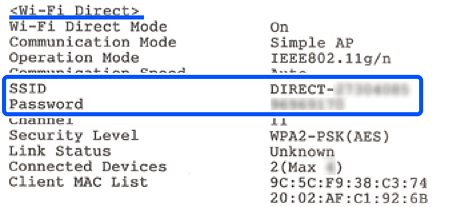
Enter the password printed on the network status sheet into the computer or mobile device.
You can confirm the status of Wi-Fi Direct on the network status sheet.
When you are using an Android device and connect to the printer using Wi-Fi Direct, the light and light flash simultaneously on the printer.
Press the button to allow the connection request.
Press the  button if you want to reject the connection request.