
Make sure there are no clips, pens, or other items on top of the document cover before opening it. If any of these items fall inside the printer, you may not be able to print or perform other operations.
Open the document cover.
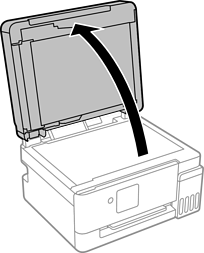
Remove any dust or stains on the surface of the scanner glass using a soft, dry, clean cloth.
If there is any dust or stains on the scanner glass, the scanning range may expand to include it, so the image of the original may be displaced or reduced.

Place the original face-down and slide it to the corner mark.
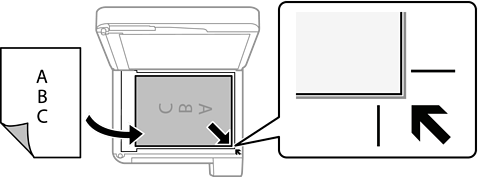
When originals are placed in the ADF and on the scanner glass, priority is given to the originals in the ADF.
Close the cover gently.
Be careful not to trap your fingers when closing the document cover. Otherwise you may be injured.
When placing bulky originals such as books, prevent exterior light from shining directly onto the scanner glass.
Do not apply too much force to the scanner glass or the document cover. Otherwise, they may be damaged.
Remove the originals after scanning.
If you leave the originals on the scanner glass for a long time, they may stick to the surface of the glass.