
The product has a low ink alert system. The accuracy of this system depends on the user refilling the ink tanks correctly. The product cannot directly measure the ink levels in the tanks; instead it estimates the amount of ink remaining by internally monitoring ink usage. The low ink alert system may generate inaccurate messages if the ink tanks are not refilled according to these instructions.
As a precaution, perform regular visual inspections of the ink tanks to ensure ink levels do not fall below the lower lines. Continued use of the product when any ink level is below the lower line on the tank could damage the product.
Select More on the home screen.
To select an item, use the 
 buttons, and then press the OK button.
Select Maintenance > Fill Ink.
Press the  button to read all the safety and usage precautions for filling ink, and then press the OK button to continue.
Open the scanner unit until it clicks.
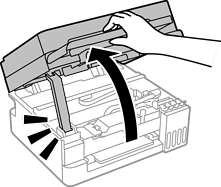
Open the ink tank cap.
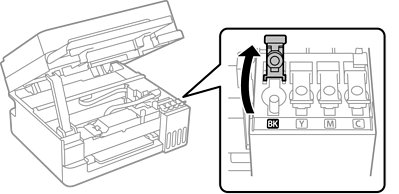
Make sure that the color of the ink tank matches the ink color that you want to refill.
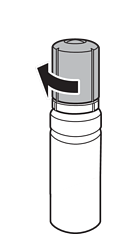
While holding the ink bottle upright, turn the cap slowly to remove it.
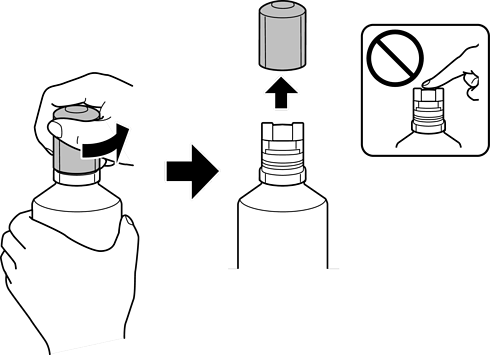
Epson recommends the use of genuine Epson ink bottles.
Be careful not to spill any ink.
Do not touch the top of the ink bottle after removing the cap; otherwise ink may get on your hands.
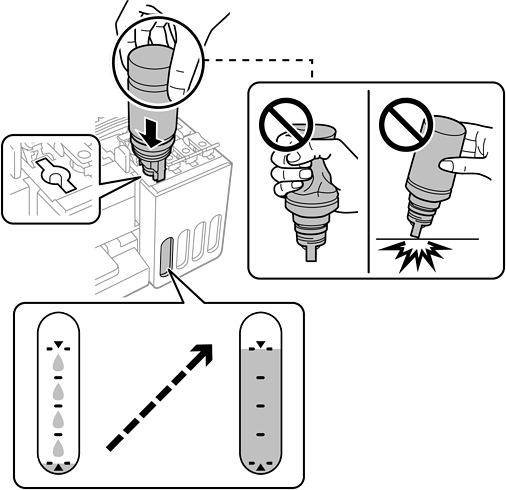
Check the upper line (a) in the ink tank.
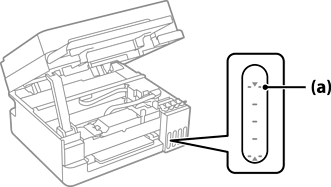
Align the top of the ink bottle with the filling port, and then insert it straight into the port to fill ink until it stops automatically at the upper line.
When you insert the ink bottle into the filling port for the correct color, ink starts pouring and the flow stops automatically when the ink reaches the upper line.
If the ink does not start flowing into the tank, remove the ink bottle and reinsert it.
However, do not remove and reinsert the ink bottle when the ink has reached the upper line; otherwise ink may leak or the printer may be damaged if the ink rises above the upper line.
When you have finished filling the ink, remove the ink bottle.
Do not leave the ink bottle inserted; otherwise the bottle may be damaged or ink may leak.
If any ink remains in the ink bottle, tighten the cap and store the bottle upright for later use.
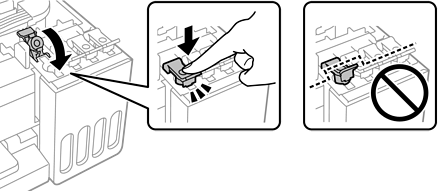
Close the ink tank cap securely.
Close the scanner unit.
For safety, the scanner unit is closed in two steps.
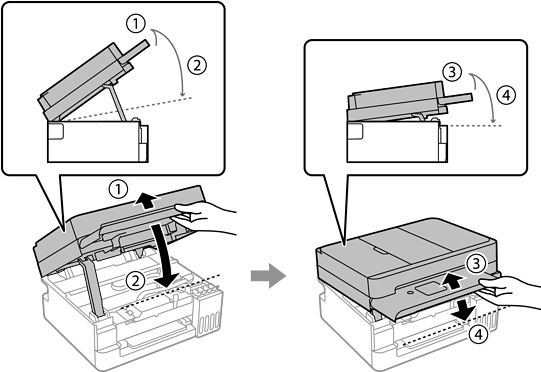
The scanner unit must be closed completely before it can be opened again.
Press the  button, and then follow the on-screen instructions to reset the ink level.
Even if you do not refill ink up to the upper line on the ink tank, you can continue using the printer. To keep your printer operating at its best, however, fill ink tank up to the upper line and reset the ink level immediately.
Unless you reset the ink level, the ink level displayed does not change even after refilling the ink.