
ET-4900 Series/L5390 Series
|
|
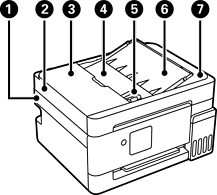
Scanner unit |
Scans placed originals. Open to remove jammed paper. This unit should usually be kept closed. |
|
|
ADF (Automatic Document Feeder) |
Holds multiple originals. |
|
|
ADF cover |
Open when removing jammed originals in the ADF. |
|
|
ADF input tray |
Feeds originals automatically. |
|
|
ADF edge guide |
Slide to the edges of the originals so that they feed straight into the printer. |
|
|
ADF document support |
Supports originals. |
|
|
ADF output tray |
Holds originals ejected from the ADF. |
|
|
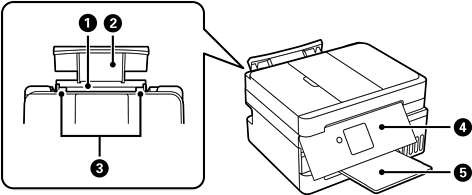
Rear paper feeder |
Loads paper. |
|
|
Paper support |
Supports loaded paper. |
|
|
Edge guides |
Slide to the edges of the paper so that it feeds straight into the printer. |
|
|
Control panel |
Indicates the printer's status and allows you to select settings. |
|
|
Output tray |
Holds the ejected paper. |
ET-2900 Series/ET-2920 Series/L3360 Series
|
|
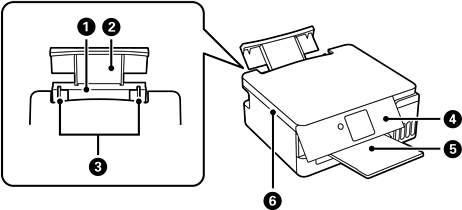
Rear paper feeder |
Loads paper. |
|
|
Paper support |
Supports loaded paper. |
|
|
Edge guides |
Slide to the edges of the paper so that it feeds straight into the printer. |
|
|
Control panel |
Indicates the printer's status and allows you to select settings. |
|
|
Output tray |
Holds the ejected paper. |
|
|
Scanner unit |
Scans placed originals. Open to remove jammed paper. This unit should usually be kept closed. |


