
|
|
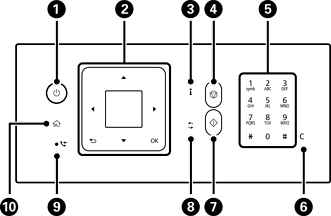
Turns the printer on or off. Make sure the power light is off before you unplug the power cord. |
|
|
Screen Displays menus and messages. Use buttons on the control panel to select menus or settings. |
|
Use the |
|
|
Press this button to return to the previous screen. |
|
|
|
Press this button to display the printer's status or solutions when an issue occurs. You can also check the network connection status. |
|
|
Press this button to stop the current operation. |
|
|
Enter numbers, characters, and symbols. |
|
|
Press this button to clear number settings such as the number of copies. |
|
|
Press this button to start an operation such as printing or copying. |
|
|
Applies to a variety of functions depending on the situation. |
|
|
Turns on when received faxes that have not yet been printed or saved are stored in the printer's memory. |
|
|
Press this button to display the home screen. |
*Only for ET-4900 Series/L5390 Series


 buttons and
  button


 *
* *
*

 *
*