
To enter characters and symbols for network settings and register contacts from the control panel, use the  ,
,  ,
,  , and
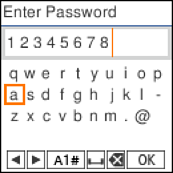
, and  buttons and the software keyboard on the LCD screen. Press the , , , or button to select a character or function button on the keyboard, and then press the OK button. When you have finished entering characters, select OK on the LCD screen, and then press the OK button on the printer.
|
Function button |
Descriptions |
|---|---|
|
|
Moves the cursor to the left or right. |
|
A 1 # |
Switches the character type. You can enter letters, numbers, or symbols. You can also switch the character type by using the |
 |
Enters a space. |
 |
Deletes the character to the left (backspace). |
|
OK |
Enters the selected characters. |
 button on the printer.