
You can select photos stored on a memory device to print onto a PVC ID card.
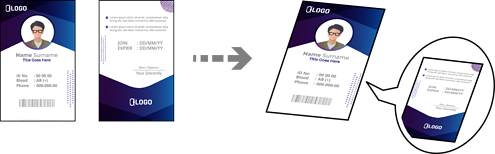
Various Prints > PVC ID Card > Print on a PVC ID Card
Before printing on the PVC ID card, see the PVC ID card handling precautions.
Do not insert the disc/ID card tray while the printer is operating. This may damage the printer.
Do not insert the disc/ID card tray until you are instructed to do so. Otherwise, an error occurs and the PVC ID card is ejected.
Place the PVC ID card in the disc/ID card tray with the printable side facing-up. Place it in slots 1 or 2 on the disc/ID card tray or in both according to the print data.
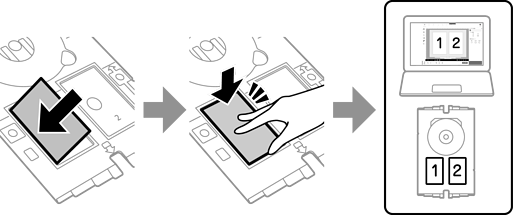
Depending on your environment, you may not be able to print to slot 2.
Insert the disc/ID card tray with the PVC ID card side of the tray toward the printer. Insert until the marks on the disc/ID card tray are aligned with the front of the printer.
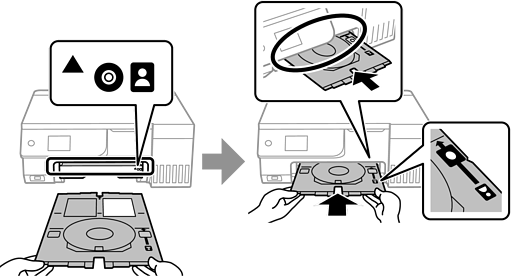
You may feel slight friction when inserting the tray into the printer. This is normal and you should continue to insert it horizontally.
When the disc/ID card tray is automatically ejected after printing is complete, pull it out and remove the PVC ID card.
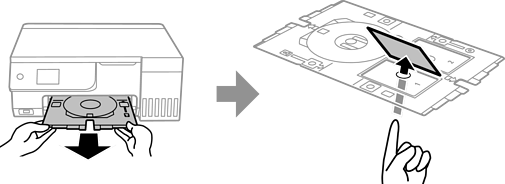
When printing is complete, remove the disc/ID card tray. If you do not remove the tray and turn the printer on or off or run head cleaning, the disc/ID card tray will strike the print head and may cause the printer to malfunction.
You can set the margin in increments of 0 to 1 mm.
The size you set is restored to its default after printing the PVC ID card. You can change the defaults in Settings > Printer Settings > PVC ID Card Margins.
To make a test print, select Test print on A4 paper, and then load A4 plain paper in the rear paper feeder. You can check the printout image before printing on a PVC ID card.
You may feel slight friction when inserting the tray into the printer. This is normal and you should continue to insert it horizontally.