
|
|
|
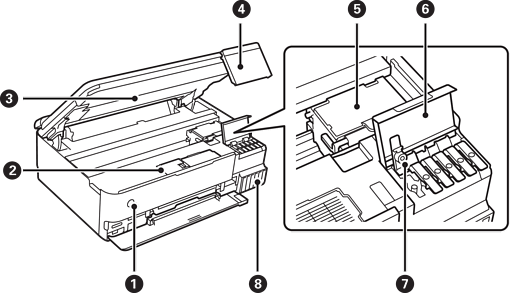
Turns the printer on or off. Unplug the power cord after checking that the power light is off. |
|
|
Maintenance box cover |
Open when replacing the maintenance box. The maintenance box is a container that collects a very small amount of surplus ink during cleaning or printing. |
|
|
Scanner unit |
Scans placed originals. Open to refill the ink tank or to remove jammed paper. This unit should usually be kept closed. |
|
|
Control panel |
Indicates the printer's status and allows you to make print settings. You can change the angle of the control panel. |
|
|
Print head |
Ink is ejected from the print head nozzles underneath. |
|
|
Ink tank cover |
Open to refill the ink tank. |
|
|
Ink tank cap |
Open to refill the ink tank. |
|
|
Ink tank |
Supplies ink to the print head. |
|
|
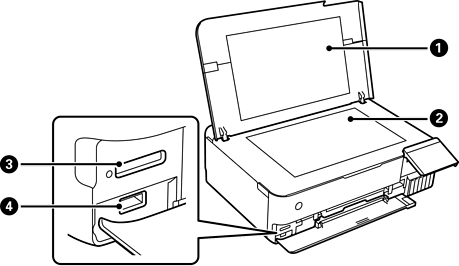
Document cover |
Blocks external light while scanning. |
|
|
Scanner glass |
Place the originals. |
|
|
SD card slot |
Insert a memory card. |
|
|
External interface USB port |
Connects an external storage device or a PictBridge capable device. |

 (Power button/light)


