
Remove the external USB device.
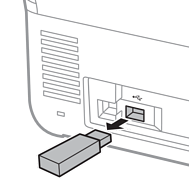
If you remove the external USB device while transferring data to the scanner, the data on the external USB device may be lost.
Also, backup the data in external storage device to another media as necessary.
The data may be lost or corrupted in the following situations:
When affected by static electricity or electrical noise
When used incorrectly
When broken or repaired
When damaged by natural disaster