This scanner is a network scanner which has four elements, Integration with Accounting Services, Computerless, Share, and Secure.
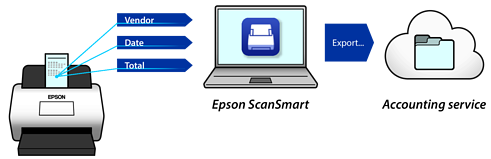
Epson ScanSmart allows you to easily scan and save receipts. The software can automatically detect accounting information from scanned invoices or receipts. You can then save or send them to your accounting service.
You can send the scanned image to a selected destination (such as network folder, email, cloud service, or external USB device) by operating the scanner's touch screen.
You can also use the smart device application Epson Smart Panel to set the scanner settings, and scan and save the images to the device.
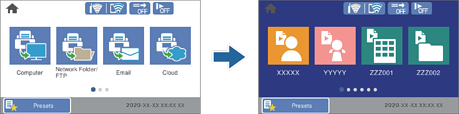
This scanner comes with an easy-to-use, large 4.3-inch touch screen.
You can customize the screen display to suit your scanning needs. By changing the icon and colors on the screen display, you can easily find your preferred scanning setting. This feature is useful when sharing the scanner with more than one person.
You can prevent accidental operations by registering frequently used settings as presets, and hiding any unnecessary features.