
You need the optimum paper settings to make full use of the paper's capabilities. When printing on paper other than genuine paper, add the paper information (media settings) to the printer and select the paper setting that best suits the paper.
Use a computer that is connected to the Internet, and perform operations after connecting your computer to the printer.
Paper information is added to your computer and printer over the Internet from a dedicated Epson server.
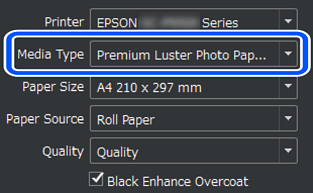
Display the add paper information screen from Epson Print Layout or the printer driver.

A list of paper information that can be added is displayed.
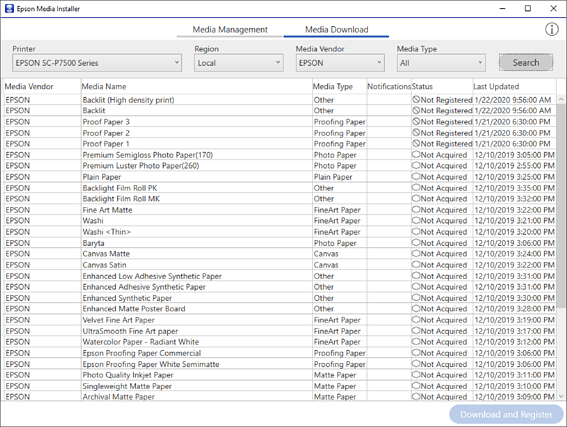
If the target paper information is not available, see the paper manufacturer's website and set the paper.
Add the paper information.
Select the target paper and click Download and Register.
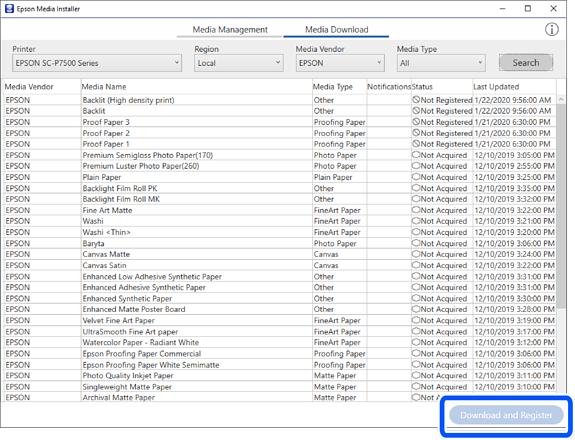
You can select the added paper information from Epson Print Layout, printer drivers, and the paper setting menus on the printer's control panel.
Select the target paper in the paper type setting in Epson Print Layout or the printer driver, and then print.
If you have added paper information, you can use the added paper's ICC profile in Epson Print Layout, printer drivers, and other applications.
