
|
|
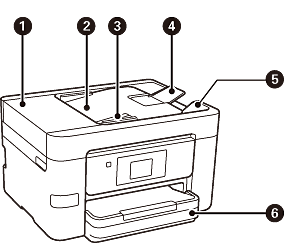
ADF (Automatic Document Feeder) cover |
Open when removing jammed originals in the ADF. |
|
|
ADF input tray |
Feeds originals automatically. |
|
|
ADF edge guide |
Slide to the edges of the originals so that they feed straight into the printer. |
|
|
ADF document support |
Supports originals larger than Letter or A4 size. |
|
|
ADF output tray |
Holds originals ejected from the ADF. |
|
|
Paper cassette 1 |
Loads paper. |
|
|
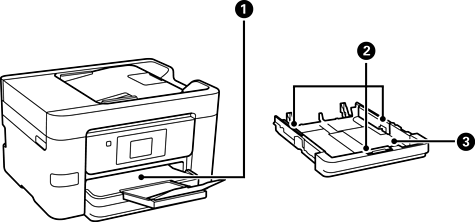
Output tray |
Holds the ejected paper. |
|
|
Edge guides |
Slide to the edges of the paper so that it feeds straight into the printer. |
|
|
Paper cassette |
Loads paper. |
|
|
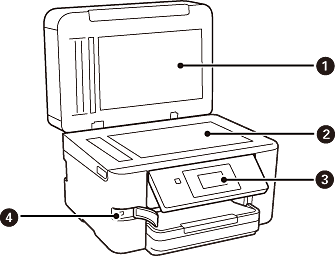
Document cover |
Blocks external light while scanning. |
|
|
Scanner glass |
Place the originals that cannot be loaded in the ADF, such as envelopes or thick books. |
|
|
Control panel |
Indicates the printer's status and allows you to perform maintenance or select settings. |
|
|
External interface USB port |
Connect memory devices. |


