
|
|
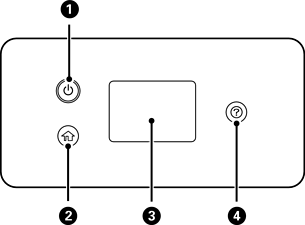
Turns the printer on or off. Make sure the power light is off before you unplug the power cord. |
|
|
Displays the home screen. |
|
|
Displays menus and messages. You can change the angle of the control panel. When no operations are performed for a specific length of time, the printer enters sleep mode and the display turns off. Tap anywhere on the touch screen to turn on the display. Depending on the current settings, pressing the power button may also wake the printer from sleep mode. |
|
|
Displays the Help screen. You can view operating instructions or solutions to problems. |


