
You can print a bar code clearly and make it easy to scan. Only enable this feature if the bar code you printed cannot be scanned.
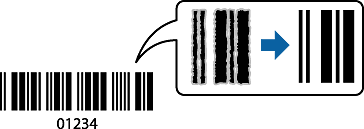
This feature is available when the printer settings are configured as follows:
Paper Type: Plain paper, Letterhead, Recycled, Color, Preprinted, High Quality Plain Paper, Thick paper, Epson Photo Quality Ink Jet, Epson Matte, or Envelope
Quality: Standard
Some barcodes may not be readable due to their size or the paper type.
On the printer driver's Maintenance tab, click Extended Settings, and then select Barcode mode.
Select other settings on the Main and More Options tabs as necessary, and then click OK.
Click Print.