
You can scan both sides of an ID card and copy it onto one side of paper.
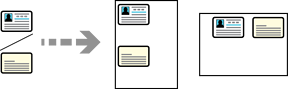
Place the originals.
Select Copy on the home screen.
Select the Advanced Settings tab, and then enable ID Card Copy.
Specify the Orientation (Original), and then select OK.
Tap  on the Copy tab.