
|
|
 |
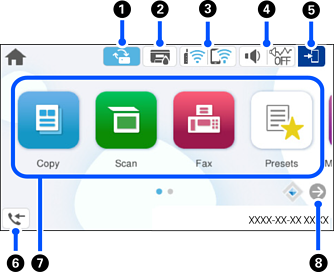
This is displayed when a firmware update is available. Tap it to update the firmware to improve the printer's features. We recommend using the printer with the latest version of the firmware. |
|
|
|
 |
Tap this to display the Supply Status screen. You can check the approximate ink levels and the approximate service life of the maintenance box. |
|
|
|
 |
Tap this to display the network connection status. See the following for more details. |
|
|
|
 |
Tap this to display the Device Sound Settings screen. You can enable Mute and Quiet Mode. You can access the Sounds menu from this screen. |
|
  |
Indicates whether or not Quiet Mode is enabled. When this feature is enabled, the noise made by printer during printing may be reduced depending on the selected paper type and print quality, but print speed may decrease. |
||
 |
Indicates that Mute is enabled. |
||
|
|
 |
Indicates that the user restriction feature is enabled. Select this icon to log in to the printer. You need to select a user name and then enter a password. Contact your printer administrator for login information. When |
|
|
|
 |
Tap this to display the Fax Data Information screen. The number displayed indicates the number of faxes that have not yet been read, printed, or saved. |
|
|
|
Allows you to access the following menus.
|
||
|
|
 |
Scrolls the screen to the right. |
|


 is displayed, a user with access permission has logged in. Select the icon to logout.


