
|
|
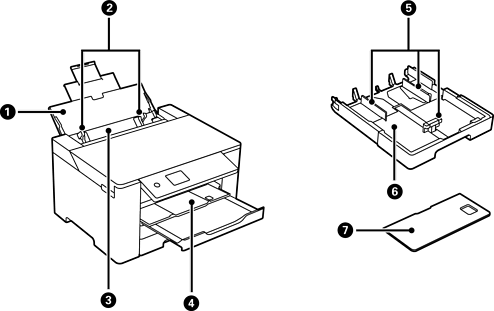
Paper support |
Supports loaded paper. |
|
|
Edge guide |
Feeds the paper straight into the printer. Slide to the edges of the paper. |
|
|
Paper tray |
Loads all paper types supported by the printer. |
|
|
Output tray |
Holds the ejected paper. When you start printing, this tray is ejected to fit the paper size automatically. To store the tray, push it manually or select |
|
|
Edge guide |
Feeds the paper straight into the printer. Slide to the edges of the paper. |
|
|
Paper cassette |
Loads paper. |
|
|
Paper cassette cover |
Prevents foreign substance from entering the paper cassette. This cover can be attached to paper cassette 1 and 2. Attach it to cover the paper cassette that is extended to load paper larger than A4-size. When you load paper without extending the paper cassette, you can attach the cover to any of the cassettes. |
|
|
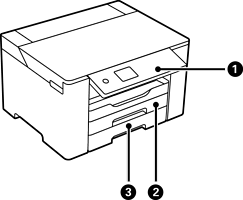
Control panel |
Allows you to make settings and perform operations on the printer. Also displays the printer’s status. |
|
|
Paper cassette1 |
Loads paper. |
|
|
Paper cassette2 |


 on the control panel.


