
Solutions
Connect the USB cable securely to the printer and the computer.
Solutions
If you are using a USB hub, try to connect the printer directly to the computer.
Solutions
If the USB cable cannot be recognized, change the port, or change the USB cable.
Solutions
Disconnect the USB cable from the computer. Right-click on the printer icon displayed on the computer, and then select Remove Device. Next, connect the USB cable to the computer.
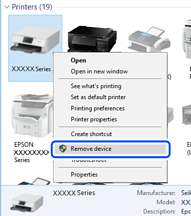
If you cannot use a USB cable, reset the USB connection by following the steps for changing the method of connecting to a computer. See the related information link below for details.
Solutions
If you connect the printer to a SuperSpeed USB port using a USB 2.0 cable, a communication error may occur on some computers. In this case, re-connect the printer using one of the following methods.
Use a USB 3.0 cable.
Connect to a Hi-Speed USB port on the computer.
Connect to a SuperSpeed USB port other than the port that generated the communication error.