
|
|
 |
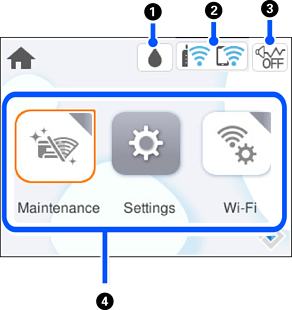
Displays the Supply Status screen. You can check the approximate ink levels and the approximate service life of the maintenance box. You can also replace the ink cartridges or print the supply status sheet. |
|
|
|
 |
Displays the network connection status. |
|
|
|
 |
Indicates that Quiet Mode is set for the printer. When this feature is enabled, the noise made by printer operations is reduced, but print speed may slow down. However, noises may not be reduced depending on the selected paper type and print quality. Select to change the setting. |
|
|
|
Displays each menu.
|
||


