When using the printer and your phone device on a single phone line, connect the phone device to the printer.
If your phone device has a fax function, disable the fax function before connecting. See the manuals that came with the phone device for details. If the fax function cannot be completely disabled, you may not be able to use your phone device as an external phone.
If you connect an answering machine, make sure the printer's Rings to Answer setting is set higher than the number of rings for the answering machine.
Remove the cap from the EXT. port on the back of the printer.
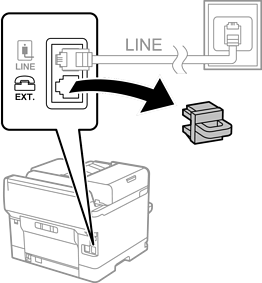
Connect the phone device and the EXT. port with a phone cable.
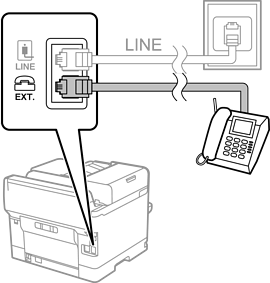
When sharing a single phone line, make sure you connect the phone device to the EXT. port of the printer. If you split the line to connect the phone device and the printer separately, the phone and the printer will not work correctly.
Select Fax on the printer's control panel.
Pick up the handset on the phone device.
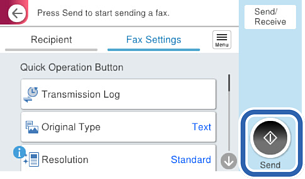
If a message to start sending or receiving faxes is displayed as shown on the following screen, the connection has been established.