
|
|
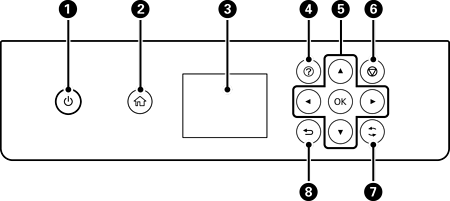
Turns the printer on or off. Unplug the power cord after checking that the power light is off. |
|
|
Displays the home screen. |
|
|
Displays menus and messages. Use buttons on the control panel to select or to make settings. |
|
|
Displays the Help screen. You can view the operating instructions or the solutions to problems. |
|
|
Use the |
|
|
Cancels the print job in progress. |
|
|
Applies to a variety of functions depending on the situation. |
|
|
Returns to the previous screen. |


 buttons to move the focus to the target, and then press the

