
|
|
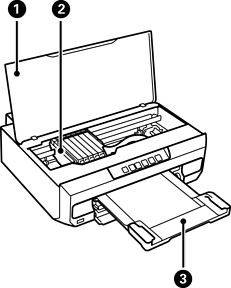
Printer cover |
Open when replacing ink cartridges or removing jammed paper inside the printer. Keep this cover closed while the printer is not in use to prevent foreign substances from entering the printer. |
|
|
Ink cartridge holder |
Install the ink cartridges. Ink is ejected from the print head nozzles underneath. |
|
|
Output tray |
Holds the ejected paper. Pull out manually and push it back in to store. |


