
When you need to store the printer or transport it when moving or for repairs, follow the steps below to pack the printer.
Turn off the printer by pressing the  button.
Make sure the power light turns off, and then unplug the power cord.
Unplug the power cord when the power light is off. Otherwise, the print head will not return to the home position , which can cause the ink to dry and make printing impossible.
Disconnect all cables such as the power cord and USB cable.
Make sure there is no memory device inserted.
Remove all of the paper from the printer.
Make sure there are no originals on the printer.
Open the scanner unit with the document cover closed. Secure the ink cartridge holder to the case by taping the protective piece that came with the printer to the top of the holder.
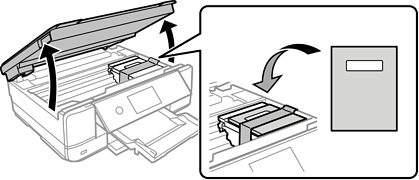
Leave the ink cartridges installed. Removing the cartridges can dry out the print head and may prevent the printer from printing.
Be careful not to trap your hand or fingers when opening or closing the scanner unit. Otherwise you may be injured.
Close the scanner unit.
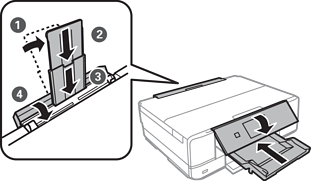
Prepare the printer for transport as shown below.
Pack the printer in its box, using protective materials.
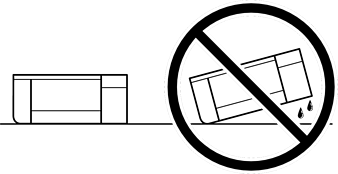
When storing or transporting the printer, avoid tilting it, placing it vertically, or turning it upside down; otherwise ink may leak.
When you use the printer again, make sure you remove the tape securing the ink cartridge holder. If print quality has declined the next time you print, run Print Quality Adjustment.