
You can set up a Wi-Fi connection by entering the necessary information from the printer's control panel. To set up using this method, you need the SSID and password for your wireless router.
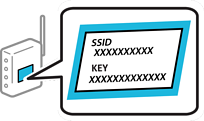
If you are using a wireless router with its default settings, the SSID and password are on the label. If you do not know the SSID and password, contact the person who set up the wireless router, or see the documentation provided with the wireless router.
Tap  on the home screen.
Select Wi-Fi.
Tap Start Setup.
If the network connection is already set up, the connection details are displayed. Tap Change Access Point to change the settings.
If the printer has already been connected by Ethernet, tap Change to Wi-Fi connection., and then select Yes after checking the message.
Select Wi-Fi Setup Wizard.
Follow the on-screen instructions to select the SSID, enter the password for the wireless router, and start setup.
If you want to check the network connection status for the printer after setup is complete, see the related information link below for details.
If you do not know the network name (SSID), check if the information is written on the label on the wireless router. If you are using the wireless router with its default settings, use the SSID on the label. If you cannot find any information, see the documentation provided with the wireless router.
The password is case-sensitive.
If you do not know the password, check if the information is written on the label of the wireless router. On the label, the password may be named "Network Key", "Wireless Password", or another similar name. If you are using the wireless router with its default settings, use the password written on the label.
If the SSID you want to connect to is not displayed, configure Wi-Fi settings using software or apps on your computer or mobile device.
U.S. and Canada
Access the following website and search for your product. Download and run your product's software package, then follow the instructions on the computer screen to run the setup program.
Other Regions
Access the following website, and then enter the product name. Go to Setup, and then start setting up.