
This method allows you to connect the printer directly to devices without a wireless router.
For iOS or Android users, it is convenient to set up from Epson Smart Panel.
You only need to configure these settings for the printer and the device that you want to connect to once. Unless you disable Wi-Fi Direct or restore the network settings to their defaults, you do not need to configure these settings again.
Tap  on the home screen.
Tap Wi-Fi Direct.
Tap Start Setup.
Scroll down the printer screen to display the SSID and password required to set up the connection. On your device, select the same SSID and enter the password.
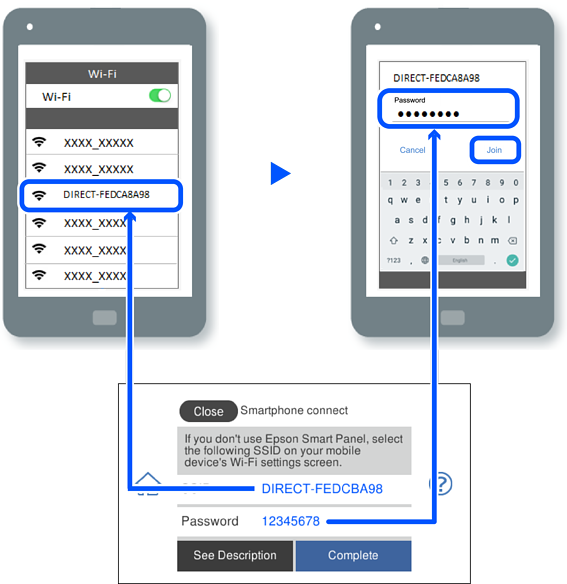
On the device's printing app screen, select the printer that you want to connect to.
On the printer's control panel, select Complete.
For devices that have been connected to the printer before, select the network name (SSID) on the device's Wi-Fi screen to connect them again.