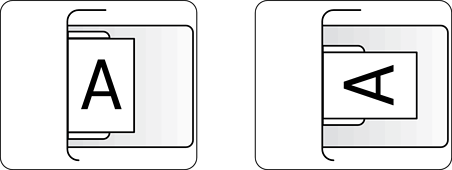
When copying onto preprinted or letterhead paper, load both paper and originals in the correct orientation.
Loading paper
See the related information below.
Loading Preprinted Paper (Printing on One Side)
Loading Preprinted Paper (Printing on Two Sides)
The loading procedure is different for single-sided and double-sided printing because the side on which the front page (first page) is printed differs. When Letterhead Mode is enabled, the printing side for the front page (first page) is the same for single-sided or double-sided printing, but you must load the paper according to the method for 2-sided printing.
Letterhead Mode is only available when Preprinted or Letterhead is selected as the paper type.
Placing originals
Place the originals in one of the following orientations.
When placing an original on the scanner glass, make sure the front side (or the first page if it is a double-sided document) is facing down.
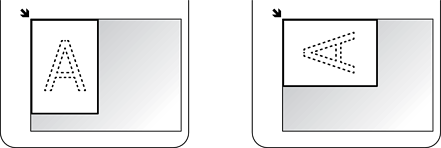
When placing originals in the ADF, make sure the front side (or the first page if it is a double-sided document) is facing up.