
Select Storage on the printer's control panel.
Select the folder containing the file you want to print, and then select Open.
Select the file, and then select Print Settings.
Select the Advanced tab, and then select Print Sets.
Select Not Set from the list, and then select Register/Overwrite.
Enter the group name.
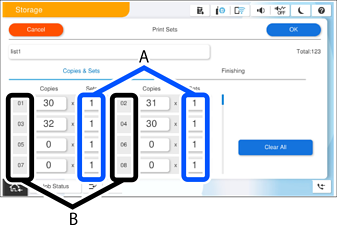
Specify the copies and sets on the Copies & Sets tab.
For example, if you wanted to print handouts for four classes (Class 1: 30 students, Class 2: 31 students, Class 3: 32 students, Class 4: 30 students) in a school, you would make the following settings.
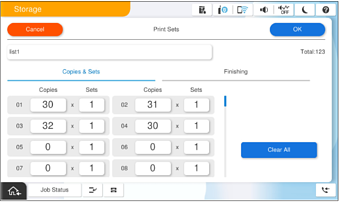
If multiple classes need the same quantity, you can group them together by changing the number of sets (set count). For example, if Group 01 and Group 04 shown above both need the same amount, set Group 01's set count to 2 instead of setting up Group 04 separately.
Select the Order of Copies settings on the Finishing tab.
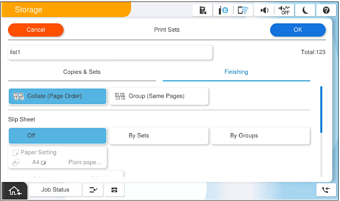
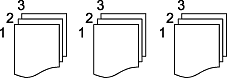
Selecting Collate (Page Order) will collate the copies in page order, producing one complete set at a time.
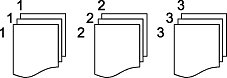
Selecting Group (Same Pages) will produce copies grouped by page, rather than collated into complete sets.
To insert slip sheets, configure the settings on the Finishing tab.
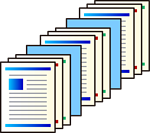
This function cannot be used in combination with 90-degree rotation (Step 10).
 You can configure slip sheet insertion points on the Finishing tab.
When By Sets is selected, slip sheets are inserted based on the unit specified in section (A) on the Copies & Sets tab. When By Groups is selected, slip sheets are inserted based on the unit specified in section (B) on the Copies & Sets tab.
 Select the paper tray that contains the sheets to be used as slip sheets.
To configure the output method, configure the settings on the Finishing tab.
This setting allows paper to be output alternately in portrait and landscape orientation (90-degree rotation).
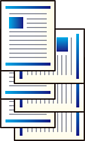
Two paper sources are used. Load paper in the portrait orientation in one paper source and in the landscape orientation in the other paper source, and then select Auto as the Paper Setting in Basic Settings.
This function cannot be used simultaneously with slip sheet insertion (Step 9).
Select Rotate Sort in Eject Paper.
Configure the unit for which 90-degree rotation is applied.
When By Sets is selected, 90-degree rotation is applied based on the unit specified in section (A) on the Copies & Sets tab. When By Groups is selected, rotation is applied based on the unit specified in section (B) on the Copies & Sets tab.
When the optional staple finisher is installed, you can configure the setting to shift the paper during output (Shift Output). The unit for shift output is configured in the same way as for 90-degree rotation.
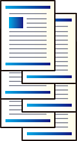
After completing all settings, select OK to save.