
The print sets feature allows you to print or copy without entering the required number of copies each time.
For example, even if the number of copies varies for each group (class or department), you can quickly print or copy by registering the number of copies and sets in the printer.
The following table shows examples of printing the print sets for four classes (one class with 30 students and three classes with 31 students) in a school.
|
Group |
01 |
02 |
|
Copies×Sets |
30×1 |
31×3 |
|
Printouts |
 |
 |
Also, you can easily sort your documents after printing by selecting the finishing settings.
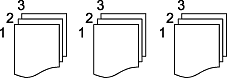
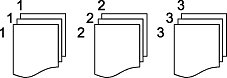
Sorting the order and printing
This is an illustration for a document with three pages.
|
Printing Each Copy (Page Order) |
Printing the Same Pages |
|---|---|
 |
 |
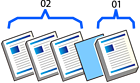
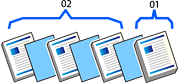
Inserting separator sheets (dividers) and printing
|
Inserting Separator Sheets Between Groups |
Inserting Separator Sheets Between Sets |
|---|---|
 |
 |
Changing paper ejection settings and printing
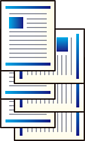
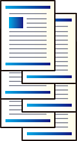
You can select the setting for groups or for sets.
To use the Shift Sort feature, the optional finisher is required.
|
Ejecting Paper by Rotating 90 Degrees |
Ejecting Paper by Offsetting |
|---|---|
 |
 |