
You can send faxes using a fax server on your network or Internet Fax-compatible device. Configuring the fax server allows you to send an email to the fax server with the fax data attached, and then send it using your printer's fax function. The fax server sends the fax using the recipient's fax number included in the e-mail address. When fax server settings are enabled, you cannot send faxes using LINE port on the printer.
Before introducing this feature to your network, consult your sales representative for more information. For details on the fax server, consult the service provider for Internet faxes.
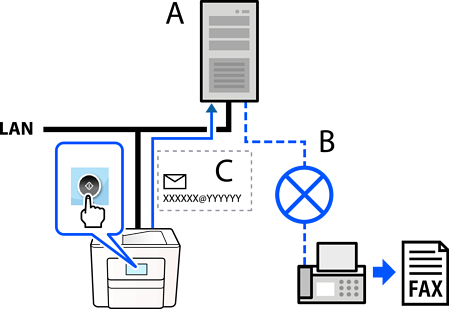
A: Fax server
B: Public Switched Telephone Network (PSTN)
C: Email with fax data attached
The ability to receive fax data by email in the "XXXXXX@YYYYYY" format, and send faxes to a fax number XXXXXX
XXXXXX: Fax number.
YYYYYY: Domain name of the fax server. Added by the printer
The ability to handle multi-Tiff format fax data attached to an e-mail