
Job Scan Screen
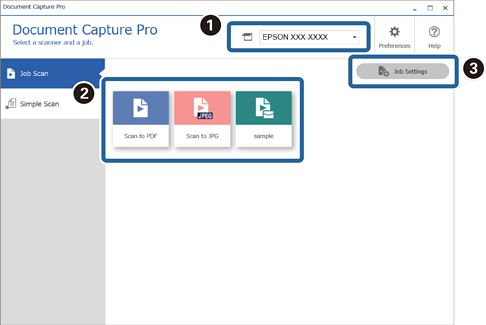
This screen allows you to execute a job just by clicking the job icon. You can register and edit jobs in Job Settings.
|
Item |
Explanation |
|
|---|---|---|
|
|
Select Scanner |
When you start the software it automatically connects to the last scanner you used. If you want to use a different scanner, you can select it from the drop-down list. |
|
|
Start Job |
Registering the following sequence of operations is called a "job": 1. Scan-2. Save-3. Index-4. Send-5. Confirm/Test You can then execute a series of operations by just clicking the registered job icon. |
|
|
Job Settings |
You can check and edit existing jobs and create new jobs. You can make settings (Button Assignment) so that you can perform job scans from the control panel (buttons) of the scanner or network interface panel (or unit). |


