
The control panel screen allows you to view animations of how to perform operations such as placing originals and performing maintenance.
Press the  button on the control panel: The Help screen is displayed. Select How To, and then select the items that you want to view.
Select Scanner Maintenance on the control panel's home screen, and then select How to Clean for each cleaning method: A video demonstrating the cleaning procedure is displayed.
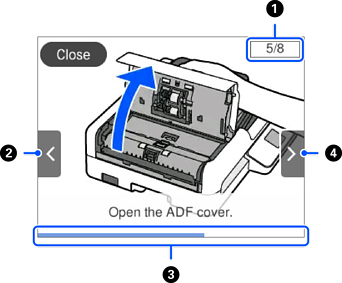
|
|
Indicates the total number of steps and the current step number. The example shows step 5 of 8. |
|
|
Moves to the previous step. |
|
|
Indicates your progress through the current step. The animation repeats when the progress bar reaches the end. |
|
|
Moves to next step. |


