
The label is attached to the top or side of the product. Under special conditions permitted by regulations, the label is attached to the bottom of the product or under the cover.
|
|
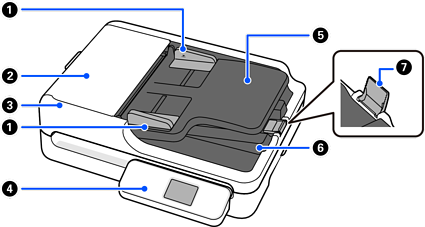
Edge guides |
Use guides to support the original in the input tray to facilitate smooth feeding. Slide to the edges of the originals. |
|
|
ADF cover |
Open it when cleaning the ADF or removing jammed paper. |
|
|
ADF (Automatic Document Feeder) |
Feeds loaded originals automatically. |
|
|
Control panel |
Displays the scanner’s status and performs scanner operations. |
|
|
Input tray |
Loads originals. |
|
|
Output tray |
Holds originals ejected from the scanner. |
|
|
Stopper |
Prevents ejected originals from falling from the output tray. |
|
|
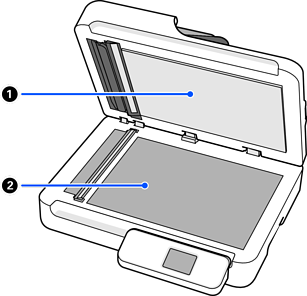
Document cover |
Blocks external light while scanning. |
|
|
Scanner glass |
Place originals that you cannot feed using the ADF. |
|
|
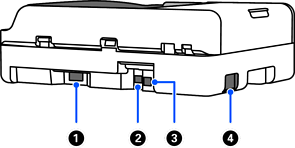
AC inlet |
Connect the power cord. |
|
|
LAN port |
Connect a LAN cable. |
|
|
USB port |
Connect a USB cable. |
|
|
External interface USB port |
Connect a USB drive. |


