
|
|
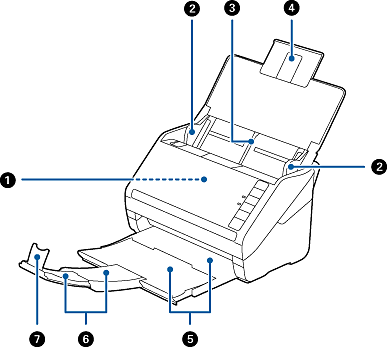
ADF (Automatic Document Feeder) |
Feeds loaded originals automatically. |
|
|
Edge guides |
Feeds originals straight into the scanner. Slide to the edges of the originals. |
|
|
Input tray |
Loads originals. Pull out the tray extension if originals are too big for the input tray. This prevents paper from curling and causing paper jams. |
|
|
Input tray extension |
|
|
|
Output tray |
Holds originals ejected from the scanner. Pull out the extension tray to the length of the originals. |
|
|
Output tray extension |
|
|
|
Stopper |
Prevents ejected originals from falling from the output tray. Adjust it to the length of the originals. |
|
|
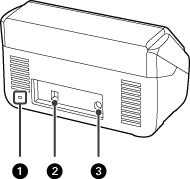
Security slot |
Insert a security lock for theft prevention. |
|
|
USB port |
Connect a USB cable. |
|
|
DC inlet |
Connect the AC adapter. |
|
|
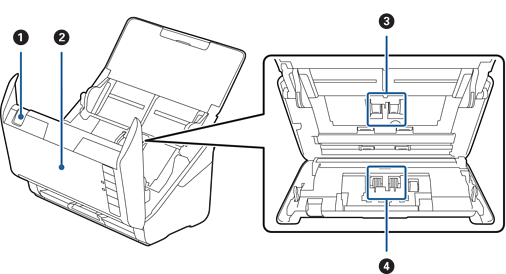
Cover open lever |
Pull the cover open lever and open the scanner cover. |
|
|
Scanner cover |
Pull the cover open lever and open the scanner cover when cleaning inside of the scanner and removing jammed paper. |
|
|
Pickup roller |
Feeds originals. This needs to be replaced when the number of scans exceeds the service number of papers. |
|
|
Separation roller |
Feeds originals separately one by one. This needs to be replaced when the number of scans exceeds the service number of papers. |


