
|
|
|
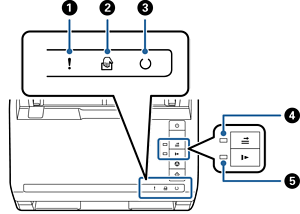
Error light |
An error has occurred. See “Light Error Indicators” for more details. |
|
|
|
|
Automatic Feeding Mode light |
The scanner is in Automatic Feeding Mode. Scanning starts when an original is placed in the input tray. |
|
|
|
|
Ready light |
On: |
The scanner is ready to be used. |
|
Flashing: |
The scanner is scanning, waiting to scan, processing, or sleeping. |
|||
|
Off: |
The scanner cannot be used because the power is off or an error has occurred. |
|||
|
|
|
Skip double feed detection light |
This is on when skipping double feed detection is enabled. |
|
|
|
|
Slow mode light |
This is on during slow mode. |
|


