
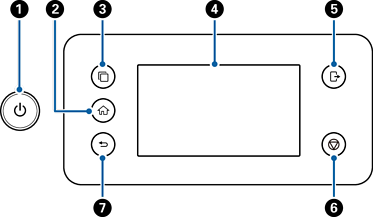
|
No. |
Name |
Function |
When Button is Available |
When Button is Not Available |
|---|---|---|---|---|
|
|
 Power button/ light |
Turns the scanner on or off. Do not turn off the scanner while the light is flashing because the scanner is operating or processing a data. |
- |
- |
|
|
 Home button |
Displays the home screen. |
When a screen other than the home screen is displayed |
When the home screen is displayed ( |
|
|
 Switch ISV server button |
Switches systems when multiple synchronized systems are registered to the scanner. |
When multiple synchronized systems are registered to the scanner |
|
|
|
LCD Screen |
Tap the screen to select menus or make settings. |
- |
- |
|
|
 Logout button |
Logs you out if you are logged in to a scanner with Lock Setting, Access Control, or an authentication system configured. |
When Lock Setting, Access Control, or an authentication system is enabled, and you are logged in to the scanner ( |
When you are not logged in to the scanner |
|
|
 Stop button |
Stops the current operation. |
When performing an operation such as scanning |
When not performing an operation |
|
|
 Back button |
Returns to the previous screen. |
When a screen other than the home screen is displayed |
When the home screen is displayed ( |


 is displayed at the top left of the screen)


 is displayed at the top right of the screen)

