
|
|
 |
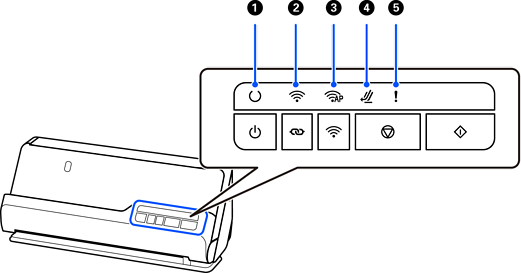
Ready light |
On: The scanner is ready to be used. |
|
|
Flashing: The scanner is scanning, waiting to scan, processing, or sleeping. |
||||
|
Off: The scanner cannot be used because the power is off or an error has occurred. |
||||
|
|
 |
Wi-Fi light |
White indicates that the scanner is connected to a wireless LAN (Wi-Fi). Blue indicates it is searching for an access point. |
|
|
|
 |
AP mode light |
Indicates that the scanner is connected wirelessly in AP mode. |
|
|
|
|
Scanner position light |
Turns on when the scanner is in the straight path position. |
|
|
|
|
Error light |
An error has occurred. See “Error Indicators” for more details. |
|


