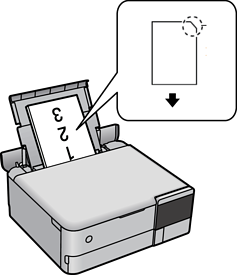
Follow the instructions supplied with the stickers to load one sheet of Epson Photo Stickers. Do not load the loading support sheets into this product.
Paper cassette 1 or Paper cassette 2
With the printable side facing down, load a sticker until it touches the back of the paper cassette 1 or paper cassette 2.

Rear paper feeder
Load a sticker at the center of the the rear paper feeder with the printable side facing up.