Filling Ink
1
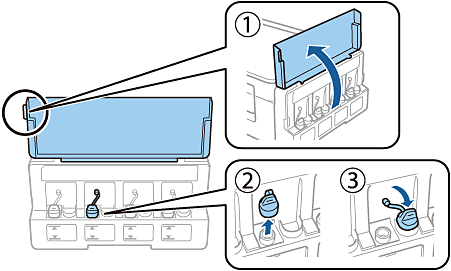
Open the ink tank unit cover, and then remove the ink tank cap.
2
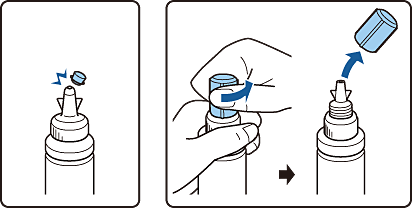
Snap off the top of the cap or remove the cap cover.
|
Important:
-
Use the ink bottles that came with your printer.
-
Epson cannot guarantee the quality or reliability of non-genuine ink. The use of non-genuine ink may cause damage that is
not covered by Epson’s warranties.
|
|
Note:
Design of ink bottles varies depending on the production date and the location of purchase.
|
3
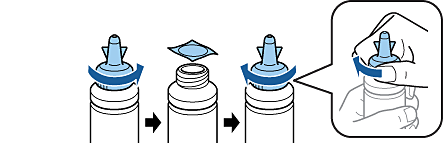
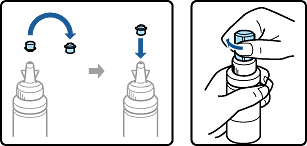
Remove the cap of the ink bottle, remove the seal from the bottle, and then install the cap.
4
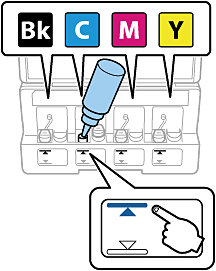
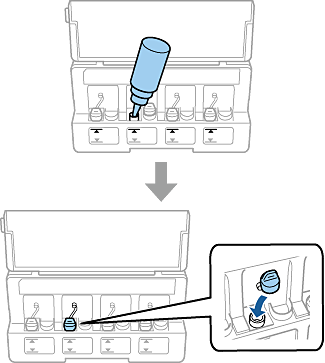
Match the ink color with the tank, and fill with all of ink.
5
Install the top of the cap or the cap cover.
6
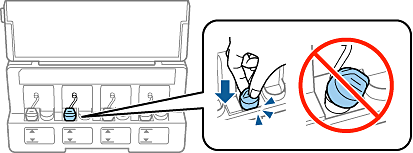
Close the ink tank cap securely.
7
Repeat the same steps to fill the rest of the ink tanks.
8
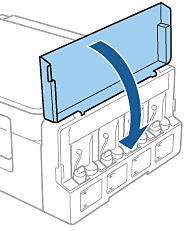
Close the ink tank unit cover.
|