
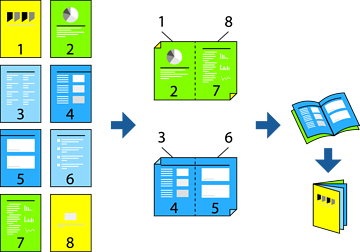
You can print a booklet that can be created by re-ordering the pages and folding the printout.
If you do not use paper that is suitable for 2-sided printing, the print quality may decline and paper jams may occur.
Depending on the paper and the data, ink may bleed through to the other side of the paper.
Select Two-sided Printing Settings from the pop-up menu.
Select Long-Edge binding in Two-sided Printing.
Select the Booklet Printing and Booklet Binding methods.
Set the other items as necessary.
Click Print.