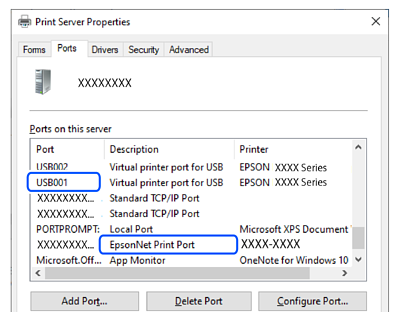
One of the following situations may be the cause.
Solutions
If a genuine Epson printer driver (EPSON XXXXX) has not been installed, the available functions are limited. We recommend using a genuine Epson printer driver.
Solutions
If you are printing a large size image, the computer may run out of memory. Print the image at a lower resolution or a smaller size.
If you have tried all of the solutions and have not solved the problem, try uninstalling and then reinstalling the printer driver
Solutions
Click EPSON Status Monitor 3 on the printer driver's Maintenance tab, and then check the printer status. If EPSON Status Monitor 3 is disabled, click Extended Settings on the Maintenance tab, and then select Enable EPSON Status Monitor 3.
Solutions
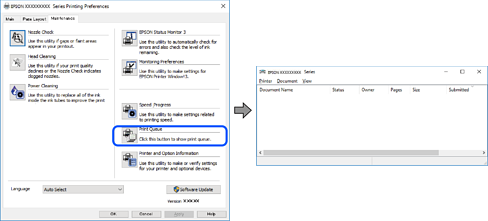
Click Print Queue on the printer driver's Maintenance tab. If unnecessary data remains, select Cancel all documents from the Printer menu.
Solutions
Click Print Queue on the printer driver's Maintenance tab.
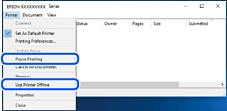
If the printer is paused or offline, clear the related setting from the Printer menu.
Solutions
Right-click the printer icon in Control Panel > View devices and printers (or Printers, or Printers and Faxes) and click Set as default printer.
If there are multiple printer icons, select the correct one based on the connection type, as described below.
USB connection: EPSON XXXX Series
Network connection: EPSON XXXX Series (network)
If you install the printer driver multiple times, copies of the printer driver may be created. If copies such as "EPSON XXXX Series (copy 1)" are created, right-click the copied driver icon, and then click Remove Device.