首頁 > 透過您的Windows®電腦使用標籤機 > 關閉標籤機上的Bluetooth®
關閉標籤機上的Bluetooth®
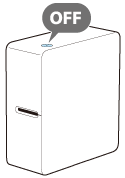
標籤機上並無配備啟用或停用Bluetooth的專用按鈕或開關。要關閉Bluetooth,請直接將標籤機關機。
 備註 備註若您不想繼續使用電腦,想改用行動裝置製作及印出標籤的話,請關閉電腦上的Bluetooth功能。 |
首頁 > 透過您的Windows®電腦使用標籤機 > 關閉標籤機上的Bluetooth®
關閉標籤機上的Bluetooth®
標籤機上並無配備啟用或停用Bluetooth的專用按鈕或開關。要關閉Bluetooth,請直接將標籤機關機。
|
備註 若您不想繼續使用電腦,想改用行動裝置製作及印出標籤的話,請關閉電腦上的Bluetooth功能。 |