
Before Using the Printer
Part Names
Setup
Basic Operations
Cleaning
Troubleshooting
Product Specifications
Appendix
Top > Part Names > Connectors
Connectors
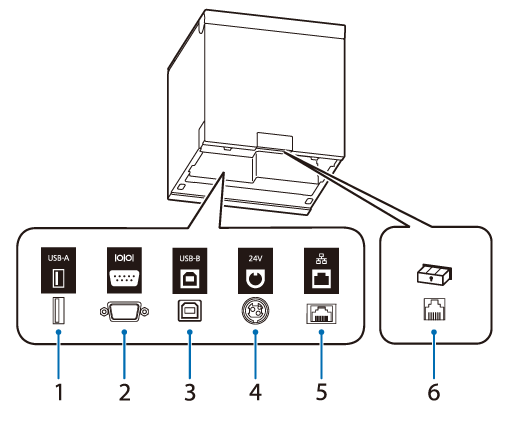
The connectors are located on the back side of the printer. When connecting interface cables or other cables, remove the printer covers before connecting.
|
1 |
USB-A connector |
For connecting a peripheral device such as a wireless LAN unit, customer display, or handheld scanner. |
|
2 |
Serial connector |
Connects the RS-232C cable. |
|
3 |
USB-B connector |
Connects the USB cable for connecting to computers. |
|
4 |
Power supply connector |
Connects the DC cable for the AC adapter. |
|
5 |
Ethernet connector |
Connects the LAN cable. |
|
6 |
Drawer kick connector |
Connects the modular cable for the cash drawer. |
Before Using the Printer
Part Names
Setup
Basic Operations
Cleaning
Troubleshooting
Product Specifications
Appendix
Top > Part Names > Connectors
Connectors
The connectors are located on the back side of the printer. When connecting interface cables or other cables, remove the printer covers before connecting.
|
1 |
USB-A connector |
For connecting a peripheral device such as a wireless LAN unit, customer display, or handheld scanner. |
|
2 |
Serial connector |
Connects the RS-232C cable. |
|
3 |
USB-B connector |
Connects the USB cable for connecting to computers. |
|
4 |
Power supply connector |
Connects the DC cable for the AC adapter. |
|
5 |
Ethernet connector |
Connects the LAN cable. |
|
6 |
Drawer kick connector |
Connects the modular cable for the cash drawer. |