
When placing multiple originals on the scanner glass, make sure they meet the following requirements.
The originals are not closer to the edges of the scanner glass that the distances shown in the illustration.
There is a gap of at least 20 mm (0.79 in.) between each original.
The originals are at least 20×20 mm (0.79×0.79 in.) in size.
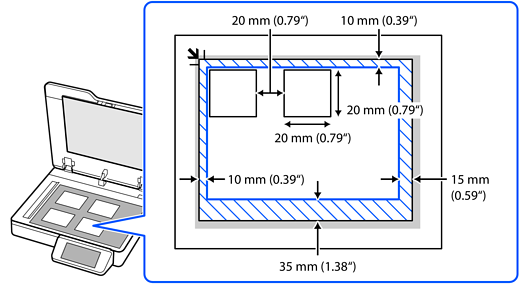
Make sure the originals are placed straight.
You can only save multiple originals as separate images when scanning from a computer.
When scanning, set Document Size to Auto Detect on the Scan Settings screen.
For some types of documents, you may not be able to scan multiple originals at the same time. Scan such originals one by one.