
|
|
|
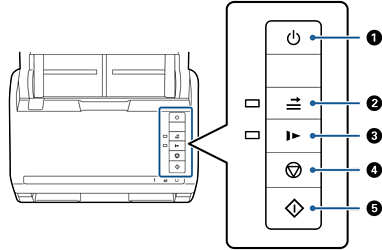
Power button |
Turns the scanner on or off. |
|
|
|
Double feed detection skip button |
Normally, an error occurs when detecting double feeds when loading envelopes, plastic cards, originals with labels or stickers, and so on. Press the 1. Open the scanner cover, and then remove the originals. 2. Close the scanner cover, and then press the 3. Load the originals. 4. Restart scanning by pressing the start button or the software button. |
|
|
|
Slow mode button |
Slow down the feeding speed when scanning. The light is on when this is enabled. Press this button in the following situations:
|
|
|
|
Stop button |
|
|
|
|
Start button |
|


