/
Tips /
Increasing the Rate of Character Recognition
Increasing the Rate of Character Recognition
Check the following to increase the recognition rate of OCR (Optical Character Recognition).
-
Check that the original is placed straight.
-
Use an original with clear text. Text recognition may decline for the following types of originals.
-
Originals that have been copied several times
-
Originals received by fax (at low resolutions)
-
Originals where the letter spacing or line spacing is too small
-
Originals with ruled lines or underlining over the text
-
Originals with handwritten text
-
Originals with creases or wrinkles
-
Invoices or receipts made of thermal paper may deteriorate with aging or friction. Scan them as early as possible.
-
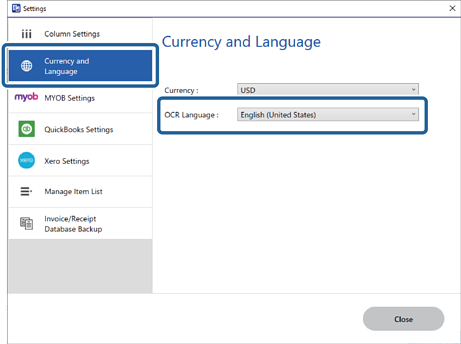
Check that the correct languages are selected.
-
When saving to Microsoft® Office or Searchable PDF files:
Check the Language in each save setting window.
-
When using Invoice/Receipt Manager:
Click  Settings on the Invoice/Receipt Manager window > Currency and Language tab > OCR Language.