About Epson ScanSmart
About This Help
Scanning and Saving Documents
Sending Invoice or Receipt Data to an Accounting Service
Exporting to QuickBooks Online
Exporting to QuickBooks Desktop (Windows only)
Exporting to Quicken
Exporting to TurboTax
Tips
Saving as Editable Files (Microsoft® Office)
Sending to a Cloud Service
Increasing the Rate of Character Recognition
Changing Settings
Changing the Scanner
Changing the Scan Settings
Customizing Actions
Changing the File Name Settings
Changing the JPEG, PDF, and TIFF Settings
Changing the Application to Scan From the Scanner
About Invoice/Receipt Manager
Managing Scanned Invoice or Receipt Data
Exporting and Importing the Invoice/Receipt Database
Saving Invoice or Receipt Data in CSV or Image Data Format
Activate Invoice/Receipt Manager
Importing Categories
Start the 30-Day Free Trial
Troubleshooting
Pressing the Scanner Button Does Not Start Scanning
Cannot Send to the Cloud Service
Cannot Access the Accounting Service
Cannot Import Invoice or Receipt Data
Scanning Speed is Slow
Files are Named with an Old Date
Cannot Export to QuickBooks Desktop
The License Key is Disabled
You can purchase a license key and activate Invoice/Receipt Manager to use all features of Epson ScanSmart.
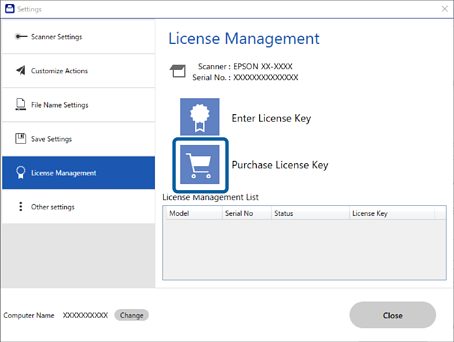
1Click Settings in the Epson ScanSmart window > License Management tab.
2Click Purchase License Key to purchase the license key for Invoice/Receipt Manager.
Follow the on-screen instructions.
The license key can only be activated for one scanner.
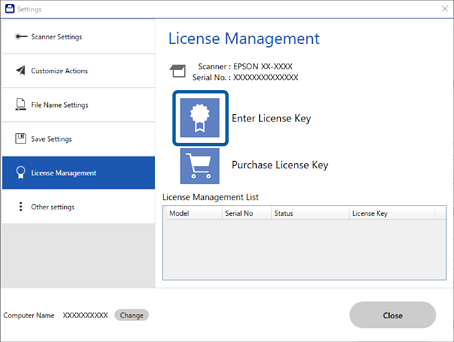
3Click Enter License Key.
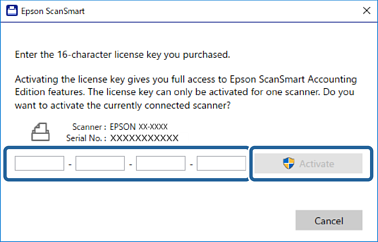
4Enter the license key you purchased and then click Activate.


 Home
Home