Before Using the Product
Part Names
Setup
Basic Operations
Cleaning
Troubleshooting
Appendix
Top > Part Names > Part Names
Part Names
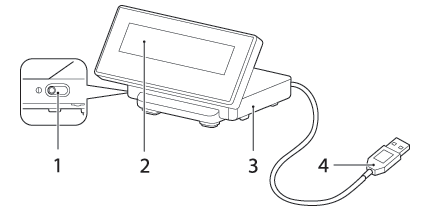
|
1 |
Contrast adjustment control |
Move this to adjust the contrast of the LCD screen. |
|
2 |
Display |
Displays on the LCD screen. You can adjust the angle of the display. Note: The display is covered with a protective film. Remove before use. |
|
3 |
Stand |
Supports the display unit. Place it on a flat surface. |
|
4 |
USB cable |
Use to connect to the printer or a computer. |
|
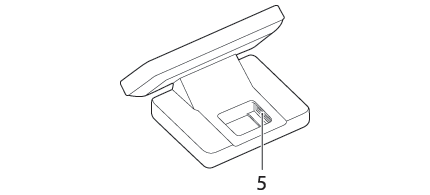
5 |
Wireless LAN unit connector |
Use to connect the Wireless LAN unit that is pre-installed to the printer’s USB connector, when connecting to a Wi-Fi® model printer. |
Before Using the Product
Part Names
Setup
Basic Operations
Cleaning
Troubleshooting
Appendix
Top > Part Names > Part Names
Part Names
|
1 |
Contrast adjustment control |
Move this to adjust the contrast of the LCD screen. |
|
2 |
Display |
Displays on the LCD screen. You can adjust the angle of the display. Note: The display is covered with a protective film. Remove before use. |
|
3 |
Stand |
Supports the display unit. Place it on a flat surface. |
|
4 |
USB cable |
Use to connect to the printer or a computer. |
|
5 |
Wireless LAN unit connector |
Use to connect the Wireless LAN unit that is pre-installed to the printer’s USB connector, when connecting to a Wi-Fi® model printer. |