Language
Epson

DM-D30

User's Manual

Epson

DM-D30

User's Manual

Before Using the Product

Important Safety InformationProduct Information PageChecking Items Included with the Customer Display

Part Names

Part Names

Setup

Connecting to the PrinterConnecting to the ComputerConnecting the Printer's Wireless LAN UnitDrawing Out the CableAffixing the Customer Display

Basic Operations

Turning the Power On/OffChanging the Angle of the Display UnitAdjusting the Contrast

Cleaning

Cleaning the Outer Case

Troubleshooting

Nothing is Displayed on the Screen

Appendix

SpecificationsRestriction of UseCAUTIONSTrademarks

Top > Setup > Connecting to the Printer

Connecting to the Printer

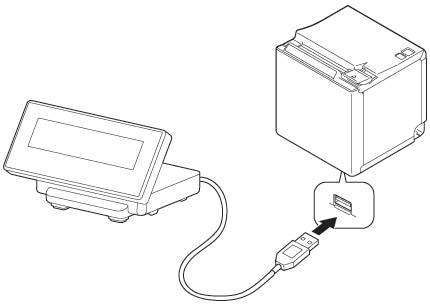
Connect the USB cable of the customer display to the USB connector on the printer.
CAUTION:
  • When you connect the USB cable to the printer, be sure to turn off the printer before connecting.

  • If extending the connection cable, use the dedicated extension cable OT-UL30. However, if connecting the wireless LAN unit to the stand of the DM-D30, you cannot use the extension cable.

Note:

For the position of connectors on the printer and so on, see the documentation provided with the printer.

  • Back
  • Top
  • Next

Before Using the Product

Important Safety InformationProduct Information PageChecking Items Included with the Customer Display

Part Names

Part Names

Setup

Connecting to the PrinterConnecting to the ComputerConnecting the Printer's Wireless LAN UnitDrawing Out the CableAffixing the Customer Display

Basic Operations

Turning the Power On/OffChanging the Angle of the Display UnitAdjusting the Contrast

Cleaning

Cleaning the Outer Case

Troubleshooting

Nothing is Displayed on the Screen

Appendix

SpecificationsRestriction of UseCAUTIONSTrademarks

Top > Setup > Connecting to the Printer

Connecting to the Printer

Connect the USB cable of the customer display to the USB connector on the printer.

CAUTION:
  • When you connect the USB cable to the printer, be sure to turn off the printer before connecting.

  • If extending the connection cable, use the dedicated extension cable OT-UL30. However, if connecting the wireless LAN unit to the stand of the DM-D30, you cannot use the extension cable.

Note:

For the position of connectors on the printer and so on, see the documentation provided with the printer.

  • Back
  • Top
  • Next

© Seiko Epson Corporation 2015-2017 (M00093403 EN)

Language selection

  • English
  • Français
  • Deutsch
  • Nederlands
  • Italiano
  • Español
  • Português
  • Türkçe
  • Ελληνικά
  • Slovenščina
  • Hrvatski
  • Dansk
  • Suomi
  • Norsk
  • Svenska
  • Polski
  • Česky
  • Magyar
  • Slovenčina
  • Română
  • Български
  • Latviešu
  • Lietuvių
  • Eesti
  • Русский
  • Українська
  • Қазақ
  • العربية
  • Bahasa Indonesia
  • ภาษาไทย
  • Tiếng Việt
  • 简体中文
  • 繁體中文(香港)
  • 日本語